What Is Two-Factor vs Two-Step Verification?
You keep seeing “enable two-factor authentication” and “turn on two-step verification” on the same settings page, and the terms sound identical. Picking the wrong one could leave your account weaker than you think, especially for email, banking, or work logins. This guide answers what is two factor vs two step in plain language, plus which option actually keeps your accounts safer.
What Is Two Factor vs Two Step? A Quick Answer
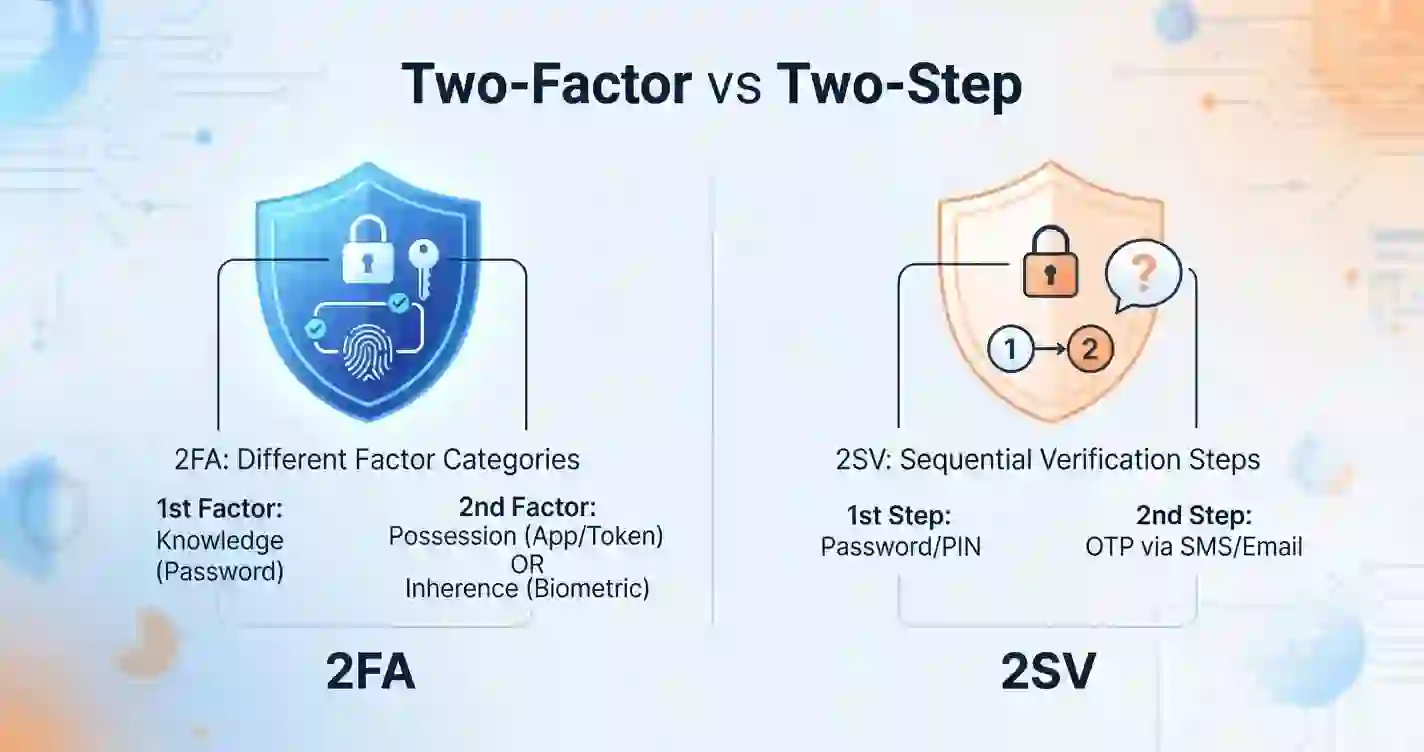
Here’s what is two factor vs two step in one sentence: two-factor authentication requires two different types of proof, while two-step verification only requires two steps, which can come from the same type of proof.
Think of it this way. A password plus a fingerprint scan is two-factor authentication, because a password and a fingerprint are completely different kinds of proof. A password plus a security question is two-step verification, because both are things you know, not two separate categories.
A few key points to remember:
- Two-factor authentication (2FA) always uses two distinct categories of proof
- Two-step verification (2SV) simply requires two steps, even from the same category
- Every 2FA setup technically counts as 2SV, but not every 2SV setup counts as 2FA
- The difference affects real-world account security, not just terminology
What Is Two-Factor Authentication (2FA)?
Two-factor authentication combines two separate categories of identity proof before granting access to an account. Security researchers group these categories into three types, and 2FA always pulls from at least two of them.
| Factor Type | What It Means | Common Examples |
|---|---|---|
| Knowledge | Something you know | Password, PIN, security question |
| Possession | Something you have | Phone, authenticator app, security key |
| Inherence | Something you are | Fingerprint, face scan, voice pattern |
A typical 2FA login asks for a password (knowledge) and then a code from an authenticator app (possession). Because those two proofs come from different categories, an attacker who steals your password still can’t get in without also holding your physical device.
What Is Two-Step Verification (2SV)?
Two-step verification simply requires two separate steps during login, regardless of which category each step comes from. This is the part most people miss when comparing what is two factor vs two step protection.
A password followed by a security question is a common 2SV example, and both steps fall under the same “knowledge” category. This setup still blocks casual intruders, but it’s weaker than true 2FA, since someone who learns your password might also guess or find your security question answer.
Google popularized the term “2-Step Verification” for its own account settings, and in practice, Google’s version usually asks for a password plus a code from your phone, which technically qualifies as 2FA too. The branding uses “step,” but the actual method often meets the stricter 2FA standard.
Two-Factor vs Two-Step: The Complete Comparison Table
Seeing the differences side by side makes the answer to what is two factor vs two step much easier to remember.
| Category | Two-Factor Authentication (2FA) | Two-Step Verification (2SV) |
|---|---|---|
| Definition | Requires two different proof categories | Requires two steps, same or different categories |
| Security strength | Generally stronger | Generally moderate |
| Example combination | Password + fingerprint scan | Password + security question |
| Common tools | Authenticator apps, security keys, biometrics | SMS codes, email codes, security questions |
| Resistance to phishing | Higher, especially with security keys | Lower, especially with SMS or email codes |
| Typical use case | Banking, work accounts, sensitive data | General consumer accounts, quick logins |
| Relationship between the two | Every 2FA setup is also 2SV | Not every 2SV setup qualifies as 2FA |
Which One Is More Secure: Two-Factor or Two-Step?
Answering what is two factor vs two step in terms of raw security comes down to this: two-factor authentication generally offers stronger protection because it forces an attacker to compromise two completely different types of security. Stealing a password alone won’t work if the second step requires a physical device or a biometric scan.
Two-step verification still adds real protection compared to a password alone, so it’s far better than no extra layer at all. The gap matters most for high-value accounts like banking, email, and work systems, where a determined attacker has more to gain.
- Choose 2FA for financial accounts, primary email, and work logins
- Two-step verification with SMS is acceptable for low-risk accounts
- Combining a password manager with either option boosts overall protection significantly
- Security keys and authenticator apps outperform text message codes in nearly every case
Real-World Examples: How Major Platforms Use Each
Seeing how well-known companies apply these methods makes what is two factor vs two step easier to picture in practice.
- Google offers “2-Step Verification,” which typically pairs a password with a phone prompt, authenticator app code, or physical security key
- Microsoft uses “two-step verification” branding, but its Authenticator app enables genuine 2FA through possession-based approval
- Banks frequently combine a password with a one-time SMS code, technically a weaker form of 2SV rather than full 2FA
- Apple ID uses two-factor authentication by default, requiring a trusted device or phone number alongside your password
Brand naming doesn’t always match the technical definition, so it helps to check the actual method being used rather than trusting the label alone.
The Three Authentication Factor Types Explained
Understanding these three categories makes every future security decision easier, not just this one comparison.
- Passwords, PINs, and responses to security questions are examples of knowledge factors.
- Possession factors include phones, authenticator apps, hardware security keys, and smart cards
- Inherence factors include fingerprints, facial recognition, and voice patterns
True two-factor authentication always draws from at least two separate categories on this list. Two-step verification can technically repeat the same category twice and still meet its own definition.
Common Methods Used in Two-Factor and Two-Step Security
Different login methods carry very different levels of real-world protection, even when they sound similar on paper.
- SMS text codes: Convenient but vulnerable to SIM-swapping attacks and interception
- Email verification codes: Simple to use but only as secure as the email account itself
- Authenticator apps: Generate time-based codes offline, offering strong, phishing-resistant protection
- Push notifications: Send an approval prompt directly to a trusted device for a quick tap
- Hardware security keys: Physical devices that confirm your identity cryptographically, considered the strongest option available
Is SMS-Based Verification Actually Safe?
SMS codes remain widely used, but security researchers no longer consider them the strongest choice available. The National Institute of Standards and Technology (NIST) has flagged SMS-based verification as a weaker method compared to app-based or hardware-based options.
Attackers can intercept text messages through SIM-swapping scams, where they trick a mobile carrier into transferring your phone number to a new device. This doesn’t mean SMS offers no protection at all; it simply means stronger alternatives exist for anyone protecting sensitive accounts.
Two-Factor vs Two-Step vs Multi-Factor Authentication (MFA)
A third term often enters this conversation and adds confusion: multi-factor authentication, or MFA. Understanding all three together clears up what is two factor vs two step for good.
| Term | Number of Proofs Required | Category Requirement |
|---|---|---|
| Two-Step Verification (2SV) | Two steps | Can be the same category |
| Two-Factor Authentication (2FA) | Two proofs | Must be two different categories |
| Multi-Factor Authentication (MFA) | Two or more proofs | Must include at least two different categories |
MFA is essentially the broader term, and 2FA is simply MFA with exactly two factors. Some high-security systems require three or more proofs, which pushes past 2FA into full multi-factor territory.
How to Choose Between Two-Factor and Two-Step for Your Accounts
Once you understand what is two factor vs two step at a technical level, the real decision comes down to how sensitive each account actually is, not just personal preference.
- Use genuine two-factor authentication with an app or security key for banking and primary email
- Reserve simple two-step verification for accounts with lower risk, like a newsletter sign-up
- Avoid SMS-only verification wherever a stronger alternative exists
- Enable biometric options on devices that support them for faster, stronger logins
- Keep backup codes stored somewhere safe in case your primary device is lost
Common Mistakes People Make With Account Security Setup
A handful of habits quietly weaken the protection people think they already have.
- Assuming any extra login step automatically means strong two-factor protection
- Relying only on SMS codes for high-value financial or email accounts
- Storing backup codes in an unsecured note instead of a password manager
- Reusing the same password across accounts even after enabling extra verification
- Ignoring prompts to upgrade from SMS to an authenticator app when one is offered
How to Turn On Two-Factor Authentication: General Steps
Most platforms follow a similar setup process, even though menu names vary slightly.
- Open your account’s security or privacy settings
- Look for “two-factor authentication,” “2FA,” or “2-step verification”
- Choose your preferred second method, ideally an authenticator app or security key
- Scan the provided QR code or link your device as instructed
- Save the backup codes somewhere safe before finishing setup
- Test the login process once to confirm everything works correctly
Signs Your Account Security Needs an Upgrade
A few warning signs suggest it’s time to strengthen your current setup.
- You’re still using SMS as your only second verification method
- You’ve never set up backup codes in case your phone is lost
- The same password protects multiple important accounts
- You can’t remember the last time you reviewed your account’s security settings
- A recent data breach notification mentioned a service you actively use
Key Takeaways
A quick recap of what is two factor vs two step, if you’re skimming or sharing this with a colleague:
- Two-factor authentication requires two different categories of proof; two-step verification only requires two steps
- Every 2FA setup counts as 2SV, but not every 2SV setup counts as 2FA
- Authenticator apps and security keys offer stronger protection than SMS codes
- Multi-factor authentication is the broader term that includes 2FA as one specific case
- High-value accounts like banking and primary email deserve genuine 2FA, not just any extra step
Frequently Asked Questions
What is two factor vs two step verification in simple terms? Two-factor authentication requires two different types of proof, like a password and a fingerprint. Two-step verification only requires two steps, which can both come from the same type, like a password and a security question.
Is two-factor authentication always better than two-step verification? Generally yes, because it forces an attacker to compromise two genuinely different types of security. Two-step verification still helps, but it can be weaker if both steps rely on information rather than a physical device or biometric.
Does Google use two-factor authentication or two-step verification? Google calls its feature “2-Step Verification,” but the actual method, usually a password plus a phone prompt or authenticator code, typically meets the stricter definition of true two-factor authentication.
Is SMS verification considered two-factor authentication? Technically yes, since a phone that receives a text counts as a possession factor. However, security researchers consider SMS one of the weaker 2FA methods due to SIM-swapping risks.
What’s the difference between two-factor authentication and multi-factor authentication? Two-factor authentication always uses exactly two proofs from different categories. Multi-factor authentication is the broader term and can include two, three, or more proofs, as long as at least two categories are represented.
Which accounts should have two-factor authentication turned on? Prioritize email, banking, cloud storage, and any work-related accounts first. These accounts often unlock access to everything else, so they deserve the strongest available protection.
Final Thoughts
You now understand what is two factor vs two step verification, and more importantly, which option genuinely protects your accounts. While two-step verification merely ensures two stages, sometimes from the same category, two-factor authentication uses two distinct categories of proof.
Today, spend a few minutes reviewing your most crucial accounts. Turn on real two-factor authentication with an app or security key wherever it’s offered, and you’ll close one of the most common gaps attackers rely on.