Ludo King: Complete Guide to Rules, Tips & Download
You downloaded Ludo King but keep losing every match to friends and family. Watching your tokens get sent back to the starting square while opponents race toward the finish feels incredibly frustrating. This complete guide breaks down every rule, hidden strategy, and game mode so you can start winning matches consistently.
What Is Ludo King and Why Is It So Popular?
Ludo King is a digital board game developed by Gametion Technologies, an Indian gaming studio based in Mumbai. The app recreates the classic cross-and-circle board game that families across South Asia have enjoyed for generations.
Since its launch in 2016, the game has crossed 500 million downloads on the Google Play Store alone. That number makes it one of the most downloaded mobile games in history.
The appeal is simple. Anyone can pick it up in under a minute. The colorful board, rolling dice, and competitive gameplay create instant excitement for players of every age group.
| Detail | Information |
| Developer | Gametion Technologies Pvt. Ltd. |
| Launch Year | 2016 |
| Genre | Digital Board Game |
| Platforms | Android, iOS, Windows |
| Total Downloads | 500M+ (Google Play) |
| Age Rating | 3+ |
| Price | Free (in-app purchases available) |
The game bridges the gap between traditional tabletop play and modern mobile gaming. You get the nostalgia of the original board combined with the convenience of playing anywhere on your phone.
How Do You Download Ludo King on Your Phone?
Getting the game onto your device takes less than two minutes. Open the Google Play Store on Android or the Apple App Store on iPhone and search for the game by name.
Tap the install button and wait for the download to finish. The app size stays under 100 MB, so it works well even on budget smartphones with limited storage.
| Platform | Store | Steps |
| Android | Google Play Store | Search → Install → Open |
| iOS | Apple App Store | Search → Get → Open |
| Windows | Microsoft Store | Search → Install → Launch |
Once installed, you can start playing immediately as a guest. Creating an account with Facebook or a phone number lets you save your progress and connect with friends.
What Are the Basic Rules of Ludo King?
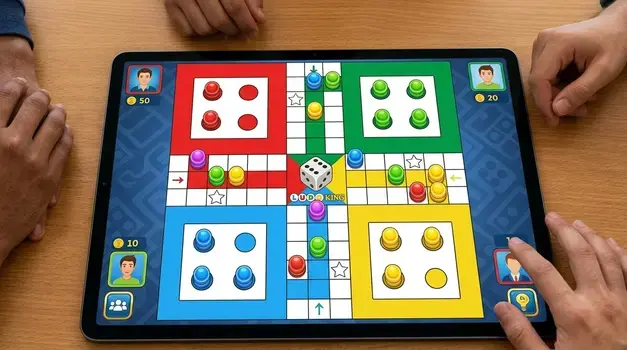
The rules mirror the traditional board game most people already know. Each player picks a color — red, blue, green, or yellow — and receives four tokens.
Your goal is to move all four tokens from the starting area to the center home triangle before your opponents do the same. You roll a virtual die to determine how many squares your token advances each turn.
A token can only leave the starting area when you roll a six. Rolling a six also grants you an extra turn, which creates exciting comeback opportunities during tight matches.
Core rules to remember:
- Roll a six to release a token from the base.
- Land on an opponent’s token to send it back to their starting area.
- Safe squares (marked with a star) protect your token from capture.
- Reach the center home column to finish a token.
- First player to get all four tokens home wins the match.
How Does Token Movement Work in Ludo King?
Token movement follows a fixed path around the board. Each color has its own starting square and home column, so no two players travel the exact same route.
When you roll the die, tap the token you want to move. The game highlights valid tokens automatically, which removes any confusion about which pieces can advance.
| Die Roll | Action |
| 1–5 | Move an active token forward by that number of squares |
| 6 | Release a new token OR move an active token six squares; earn a bonus roll |
| Three consecutive 6s | Turn forfeited (anti-cheating rule) |
Strategic token placement matters more than luck. Keeping your tokens spread across the board gives you more options on every roll and reduces the chance of losing multiple pieces in a single capture.
What Game Modes Does Ludo King Offer?
The app provides several ways to play, whether you want a quick solo match or a full multiplayer showdown with friends.
Available game modes:
- Classic Mode: The standard four-player game following traditional rules.
- Quick Mode: A faster version where each player gets two tokens instead of four. Matches finish in roughly five minutes.
- 2-Player Mode: A head-to-head battle perfect for one-on-one competition.
- Local Multiplayer: Pass-and-play on a single device with up to four people in the same room.
- Play With Friends: Create a private room and invite specific players using a room code.
- Computer Mode: Practice against AI opponents at varying difficulty levels.
| Game Mode | Players | Duration | Best For |
| Classic | 2–4 | 10–20 min | Full experience |
| Quick | 2–4 | 3–7 min | Fast sessions |
| 2-Player | 2 | 5–10 min | Head-to-head |
| Local | 2–4 | 10–20 min | Family game night |
| Friends Room | 2–4 | 10–20 min | Remote play |
| Computer | 1 | 5–15 min | Solo practice |
How Can You Win More Games in Ludo King?
Winning requires a mix of smart positioning and patience. Many new players make the mistake of rushing a single token toward home while leaving the rest in the base.
Spread your tokens across the board instead. This approach gives you multiple movement options on every roll and makes it harder for opponents to block your path entirely.
Five winning strategies:
- Open all four tokens early. Use your sixes to release every piece before pushing any single one forward.
- Hunt opponent tokens near your base. Capturing a piece close to your starting area costs your opponent the most progress.
- Park tokens on safe squares. Star-marked squares prevent captures, so use them as resting points while you plan your next move.
- Block narrow passages. Position two tokens on adjacent squares to slow down trailing opponents.
- Save your sixes for critical moments. When possible, hold a token near the home column and use a six to finish it quickly.
Is Ludo King Safe for Children to Play?
Parents often ask whether the app is appropriate for young kids. The game carries a 3+ age rating on both major app stores, which signals that the content contains no violence, inappropriate language, or mature themes.
The in-game chat feature can be disabled from the settings menu, which removes any risk of strangers contacting your child during online matches.
Ludo King also offers an offline computer mode that requires no internet connection at all. This option gives children a safe way to enjoy the game without any exposure to online interactions.
Can You Play Ludo King Offline Without Internet?
Yes. The app includes a fully functional offline mode that lets you play against computer-controlled opponents. This feature works perfectly during flights, road trips, or anywhere with poor network coverage.
Local multiplayer also runs without an internet connection. Hand your phone to a friend and take turns rolling the die on the same screen.
The only modes that require Wi-Fi or mobile data are the online multiplayer and “Play With Friends” options. Everything else works completely offline.
How Does the Ludo King Ranking System Work?
The game tracks your performance through a tiered ranking system. Every online match you win earns you ranking points, while losses deduct a smaller number of points.
| Rank Tier | Points Range | Skill Level |
| Beginner | 0–500 | New players learning the basics |
| Intermediate | 501–1,500 | Consistent players with solid strategy |
| Advanced | 1,501–3,000 | Skilled players who win most matches |
| Expert | 3,001–5,000 | Highly competitive players |
| Master | 5,000+ | Top-tier players with deep game knowledge |
Climbing the ranks unlocks new board themes, dice skins, and avatar frames. These cosmetic rewards give you a visible way to show off your progress to other players.
Which Ludo King Strategies Are the Best for Novices?
New players often rely entirely on luck and roll the die without thinking ahead. Shifting your mindset from reactive to proactive will improve your win rate almost immediately.
Beginner strategy checklist:
- Never leave a token alone in enemy territory. Pair your tokens together or keep them on safe squares whenever possible.
- Prioritize capturing over advancing. Sending an opponent’s token back to the start is almost always more valuable than moving your own piece forward a few squares.
- Watch the board before you tap. Take two seconds to scan all four of your tokens and pick the move that creates the best position for your next turn.
- Practice in computer mode first. Playing against the AI helps you learn the board layout and safe square locations without the pressure of a live match.
How Do You Play Ludo King With Friends Online?
Playing with friends is the most popular way to enjoy the game. Open the app, tap “Play With Friends,” and choose whether you want to create a new room or join an existing one.
When you create a room, the app generates a unique six-digit code. Share this code with your friends through WhatsApp, text message, or any chat app.
Once everyone joins, the host taps “Start” and the match begins. You can chat with your friends using the built-in emoji reactions and quick-text messages during the game.
What Makes Ludo King Different From Traditional Ludo?
The physical board game and the digital version share the same core mechanics, but several key differences set the app apart.
| Feature | Traditional Ludo | Ludo King App |
| Players Needed | 2–4 in the same room | 2–4 from anywhere in the world |
| Setup Time | 2–5 minutes | Under 30 seconds |
| Dice Rolling | Physical die | Animated virtual die |
| Rule Enforcement | Manual (players self-police) | Automatic (app handles all rules) |
| Game Variants | One standard version | Six different modes |
| Progress Tracking | None | Rankings, stats, and rewards |
| Portability | Requires a physical board | Fits in your pocket |
The automatic rule enforcement eliminates arguments about illegal moves. The app handles everything from token release to capture validation, so every match runs smoothly.
Start Winning Your Next Match Today
You now have every rule, strategy, and game mode explained in one place. The difference between losing and winning comes down to smart token placement, patient play, and knowing when to capture instead of run.
Launch the program, select a mode that works for you, and use these tactics in your very next game.Share this guide with the friends who keep beating you — then challenge them to a rematch.